
Standard deviation is a measure of variance or dispersion of values
from a mean or average. It describes how a set of values are distributed
from a central value commonly called the average or mean. If outliers
(values either much higher or lower than the other values) are present,
then the standard deviation of the values is higher than if the outliers
were not present.
Using the standard deviation method of calculating the minimum and maximum
values reduces the effect of skew
in the distribution of colors. If the distribution has outliers that visually
affect the color distribution, a low standard deviation value such as
2 will produce better results. If the visual effect of the outliers is
not as significant, then a higher standard deviation value such as 3 or
4 are likely applicable values.
Using low standard deviation values when outliers are not as prominent
will result in using too much color on either end of the spectrum. In
contrast using high standard deviation values when outliers do have a
significant impact on the distribution of colors will result in not enough
colors on the ends of the spectrum.
1. Open the Properties dialog box by clicking the  button on the
LP360 toolbar.
button on the
LP360 toolbar.
2. Click the Symbology tab, then click the RGB Values tab.
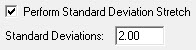
3. Click inside the check box for "Perform Standard Deviation Stretch".
4. Input a value greater than zero into the "Standard Deviations" text box below.