QCoherent Software, LLC


Toggling the Use of Type Values for a Conflation Point Cloud Task


About Toggling the Use of Type Values for a Conflation Point Cloud Task

When using a type field, other than None, types can be toggled on or off. If the type value is turned on, features sharing that value will be included in the conflation process. If the type value is not turned on, features with those type values are excluded from the process.

Learn more about selecting type fields

Including and Excluding Type Values

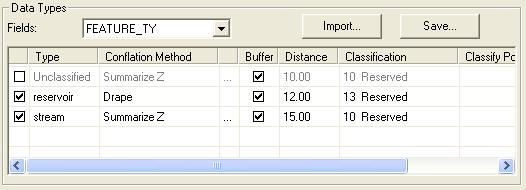
Features sharing the type value of "Unclassified" from the "FEATURE_TY" field will be excluded from the conflation process.

How to Toggle the Use of a Type Value

  1. Within the Conflation point cloud task property page, click the check box to the far left of the type list view.

  2. If the checkbox IS checked, the features with the type value WILL be used in the conflation. If the type value is NOT checked, features with the type value WILL NOT be used in the conflation.