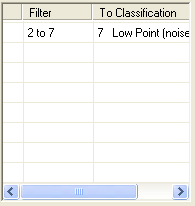

The Filters List is contained within the Basic
Filter Property Page. Any point
filters that are set to run with the Basic Filter are visible.
You can Add, Remove, and Modify the point filters. The sequence order
of the point filters can be rearranged when more than one point filter
is included.
Learn
how to add a new filter
Learn how to edit a filter
Learn
how to remove a filter
Learn
how to clear all filters
Learn
more about the Add Filter dialog
Learn
how to move a filter up in the list
Learn
how to move a filter down in the list