
*This feature is available in the Standard license level and above for LP360.
The Ground Cleanup Filter Point Cloud Task is a task in LP360 for Windows used to clean up areas where the ground classification has left unclassified patches. It can also be used for automatic ground extraction in localized areas. This is useful for the automatic classification of stockpiles and it can be chained in a macro with the height filter following to classify conveyors over stockpiles.
Command Requirements
|
Use the Add Files command to open the LAS files that contain the data you want to use.
Use the Add Task command to create a new point cloud task. When you are selecting a Task Type in the Add Point Cloud Task dialog, select Ground Cleanup Filter. Once you click OK, you should see the unique name that you gave your task selected in the list and the Ground Cleanup Filter property page displayed on the Point Cloud Task tab.
Specify the settings for the Ground Cleanup operation in the Properties page that displays.
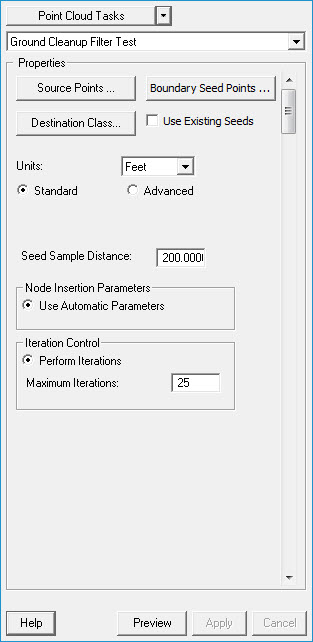
Source Points
The set of points that will be used in the filter. If a classification is not turned on or is a part of the filter, then those points will not be used in the filter nor will they be classified or edited.
Boundary Seed Points
The set of points that will be used as boundary seed points.
Destination Class
The classification to assign to ground points.
Use Existing Seeds
Toggles the use of previously existing seeds.
Units
The units setting is used to convert your unit preference to the current Map units. For example, if you set your "Seed Distance" units as meters but the Map units are feet, the processing algorithm will automatically convert the settings to feet. This allows you to predefine a standard set of parameters without needing separate settings for different Map units.
Seed Sample Distance
The desired distance between seed points. This distance should be at least as big as the largest structure in the data set. Also note that dense canopy can influence the appropriate seed sample distance where dense canopy can prevent points penetrating to the ground, thus creating large gaps between points that are ground points. The seed sample distance for any particular area in a data set can be considered constant, that is as point density increases or decreases the seed sample distance stays the same. As the seed distance decreases below the size of the largest gap between ground points, a higher probability of choosing incorrect seeds will exist. Where as the distance increases significantly bigger than the largest gap, the spacing between seed points increase resulting in a coarse seed surface which will allow a greater number of points that are not ground points to be inserted into the surface (i.e., higher commission errors).
Node Insertion Parameters
Use Automatic Parameters
Selecting this option (it is forced to this setting when using the Standard dialog option) causes the Ground algorithm to automatically set optimal values for the "Angular Threshold" and "Maximum Distance" parameters.
Use specified values for initial iteration
The algorithm computes a "best guess" for the initial values for the Angular Threshold and Maximum Distance parameters. These values are then algorithmically adjusted with each subsequent iteration. Check this radio button option if you would like to override the initial "best guess" with your own set parameters. The parameters will be automatically modified in subsequent iterations. This option can be useful if you are performing classification in very hilly areas with buildings and/or tree canopy and want to start the first iteration with large distance and angle parameters to minimize first pass misclassifications. Advanced Option
Use specified values for all iterations
This option is similar to the "Use Specified Values For Initial Iteration Option" previously discussed but keeps your defined values for all iterations. This option is useful for very difficult terrain. Advanced Option
Angular Threshold (degrees)
The maximum allowed angle in degrees between a candidate point and each of the triangle facet nodes (i.e., a0 lte threshold AND a1 lte threshold AND a2 lte threshold). a0, a1, a2 are angles that are calculated between the candidate point (c), a triangle node (n0, n1, n2), and the closest 3D point between c and the triangle facet (c0). The segment c to c0 is the vertical leg (opposite side) of the right triangle, where n0 to c0 is the adjacent side, and n0 to c is the hypotenuse.
Higher angles will allow points that are further away from a tin facet or closer to the triangle nodes to be inserted into the surface. Higher angles generally produce more slope in the resulting surface. Higher angular values may need to be used in rolling terrain as opposed to flatter terrains. Advanced Option
Maximum Distance
The maximum allowed distance between a candidate point (c), and the closest 3D point between c and the triangle facet (c0). Higher values will insert points that are further from the tin facet into the surface. Larger distances generally produce more slope in the resulting surface. Larger distance values may need to be used in rolling terrain as opposed to flatter terrains. Advanced Option
Direction/Edge Control
Omit Edge climbing algorithm
Toggles the use of the Edge climbing algorithm.
Iteration Control
Perform Iterations
Use this option to iteratively generate the surface by inserting new nodes with each iteration. The process stops when no new points are added to the surface.
Maximum Iterations
If one chooses "Perform Iterations" as the option for Iteration Control, the algorithms will perform the number of iterations you have set in this field. We recommend that you run a sample area with this value set to a small number (for example: 4) to check the results of the classification. Adjust this number upward until you reach the desired density of ground points. It is unusual for the ground density to significantly increase beyond a setting of around 10 iterations. If you set this value to a very large number (several hundred, for example), the algorithm will iterate until no additional points are added to the ground class.
Classify only seed points
Use this option to only locate seed points. No iterations of the filter are made and only the seed points are classified. This can be a useful option for running the filter as a first pass, clean up the seed points, then use the Use existing ground points as seeds option to execute the filter again. Advanced Option