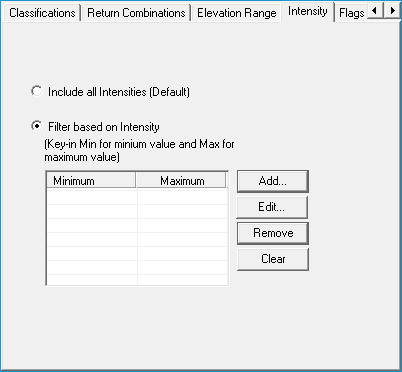

The Intensity Filter allows you to filter the points based on their intensity values. This can be done simply for display purposes and also for performing point cloud tasks. A point filter is defined using the Display Filter Property Pages.
Selecting this option includes all the points to display or to process a point cloud task. This is the default option. When this option is selected, the "Add", "Edit", "Remove" and "Clear" buttons will be disabled.
This option lets you key-in the ranges of minimum and maximum intensity values to consider for display or to process a point cloud task.
When this option is selected, the "Add", "Remove" and "Clear" buttons will be enabled. The description of each button is given below.
Add - Clicking this button adds a new row in the adjacent list view for entering a minimum and maximum value.
Edit - Clicking this button allows you to edit the values within a row from the adjacent list view.
Remove -Clicking this button removes a row from the adjacent list view. This means the minimum and maximum values present in the row are removed from the Intensity Filter.
Clear - Clicking this button removes all the rows from the adjacent list view. This results in a filter with no minimum and maximum values.
Guidelines
You can enter any valid integer as a minimum value.
You can enter the word "Min" (not case sensitive) to set the minimum value of all points.
If a maximum value is already entered, then minimum value should be less than maximum value.
You can enter a valid integer as maximum value.
You can enter a word "Max" (not case sensitive) to set the maximum value of all the points.
If a minimum value is already entered, then the maximum value should be greater than the minimum value.
You can specify any number of minimum and maximum value pairs.