LP360 Help
Click here to see this page in full context
Exporting All Tasks
About Exporting Tasks
Exporting tasks can be an excellent way to share configurations of tasks with co-workers. The exported tasks are saved to XML files that can be imported using the
"Import Task(s)"
command.
How to Export Tasks
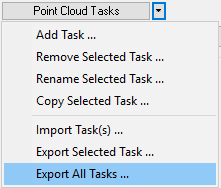
Export Tasks Command
Left-click the 'Export All Tasks..." command.
Navigate to a folder and input a filename.