QCoherent Software, LLC


Importing a Task(s)


About Importing Tasks

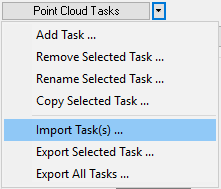
To facilitate use of point cloud tasks from user to user, one or more tasks may be imported from an XML file that was created using one of the Export Task commands on the Point Cloud Tasks Menu. Once the task(s) have been imported they become part of the tasks collection.
Learn more about exporting the active task

Learn more about exporting all tasks

How to Import Tasks

Import Task(s) Command

  1. Left-click the 'Import Task(s)...' command.

  2. Browse to a compatible XML file, then left-click the Open button to import the selected XML file.
