About Grouping Statistics by Attribute
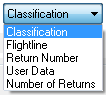
Extracted summaries can be grouped by any nominal data type that exists
within the point records. This includes the classification, point
source/flight line, return number, number of returns, or data fields.
Fields that pertain to a value related to the grouping
attribute
have predetermined codes that appear in the field names. The following
list outlines the codes used in the field names when grouping by an
attribute:
- Classification: CL
- Point Source: PS
- Return Number: RN
- Number of Returns: NR
- User Data: UD
For example when grouping by classification, a field will be added
to the database reporting the point count for each unique class value.
If the class values of 0, and 2 were found there would be two fields
added to the database starting with 'CL' for classification, then
'Cnt' to designate a count then the values
of 0 and 2 to form the fields CLCnt_0, and CLCnt_2. These fields would
be interpreted as the point count for class value of 0 or 2.