*This feature is available in Basic license level and above for LP360.
The Point Cloud Statistics Extractor point cloud task allows you to summarize data within point clouds. You can summarize information for individual files or as a group defined by geometry such as polygons. The summary information is stored as shapefiles representing the polygon used to produce the summaries, or as a delimited text file. Saving the summary to a shapefile is particularly useful for displaying the results of the summary which can easily reveal trends in the data that is not easily recognized using the raw point cloud. The following describes the different options you can choose when executing the statistics point cloud task.
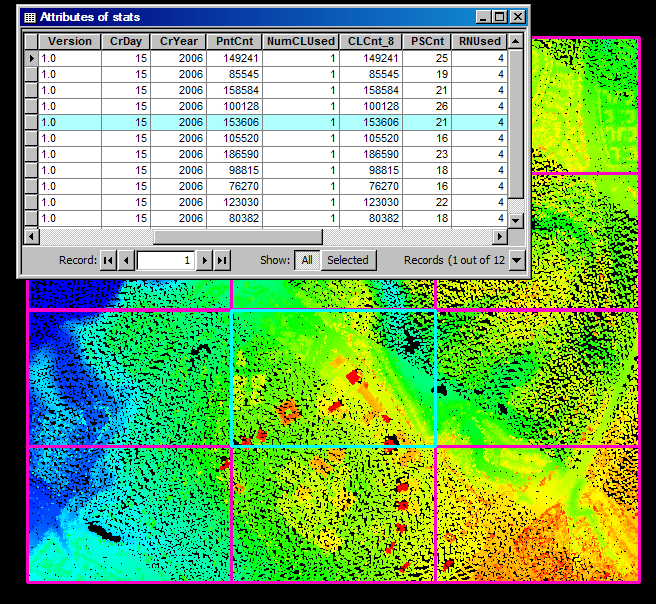
The Point Cloud Statistics Extractor produces summaries in shapefile format. The summaries are stored in the attribute table, and the geometry used to define the areas for the summaries are saved as the shapes for the file.
1. Use the Add Files command to open the LAS files that contain the data you want to use.
2. Use the Add Task command to create a new point cloud task. When you are selecting a Task Type in the Add Point Cloud Task dialog, select Point Cloud Statistics Extractor. Once you click OK, you should see the unique name that you gave your task selected in the list and the Point Cloud Statistics Extractor property page displayed on the Point Cloud Task tab.
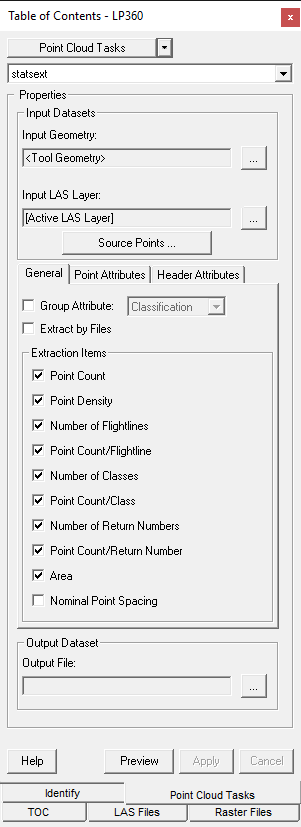
3. Specify the settings for the Point Cloud Statistics Extractor operation in the Properties page that displays.
Extracted data (i.e., shapes, and attributes) using the extract by file option
Learn how to modify the source filter
Learn how to group statistics by an attribute
Learn how to extract summaries by las files
Learn how to select header attributes to extract
Learn how to extract various point counts
Learn how to extract point densities, area, and nominal point spacing
Learn how to summarize by individual point attributes
Learn how to specify the extracted statistics output file Learn how to extract the nominal point spacing