
QCoherent Software, LLC


Selecting a Destination Class


About the Destination Class

The destination class defines the class value that points are set to when the points fit a defined plane.

If the destination class is included in the point
filter, it is automatically removed at the time the task is executed on point cloud data.

Learn more about the point filter


How to Modify the Destination Class

Destination Class Box

  1. On the Planar Point Filter property page, click on the Destination Class box.
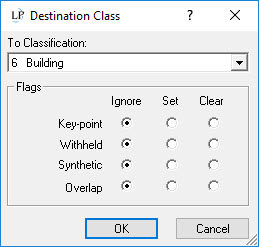

  2. Within the Destination Class dialog, select the Classification in the list you wish to set points to when executing the task. Apply any applicable flags to the destination class. Click the 'Apply' button to commit the change.