The Downstream Constraint method is used to create 3D polylines that are guaranteed to flow in the downhill direction. This method is useful for creating breaklines that hydrologically enforce streams in a downhill direction.
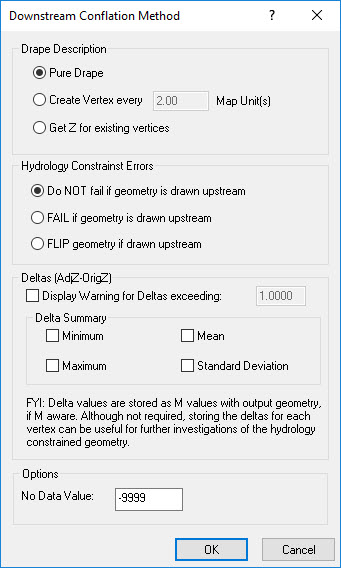
The first step in the conflation method is to perform a drape of the geometry to the LIDAR surface. The drape is performed by the Drape Conflation Method using your selection of the drape description.
Once the input geometry is draped to the LIDAR surface, a downstream constraint algorithm is invoked on the output geometry to ensure that the vertices will flow downhill. The algorithm using linear interpolation will burn through uphill areas. The following diagram demonstrates how the algorithm works on a simple LIDAR surface profile.
Downstream Constraint Algorithm Illustration
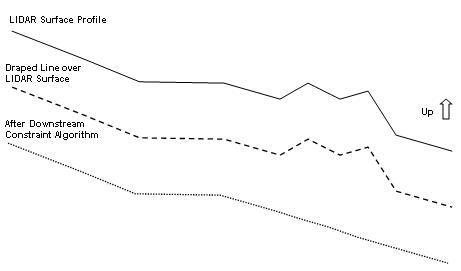
As illustrated in the diagram, flat areas are acceptable to the algorithm and does not attempt to lower or raise the 3D line to create downhill flow.
The downstream constraint algorithm is directionally biased. If the line is drawn in a general downstream direction (i.e., "from" point is higher than the "to" point), the z values on the output line will lower the draped values producing a "burning" effect (i.e., cut through the terrain surface that is noisy). The illustration above demonstrates the lowering of the draped values. If the line is drawn in an upstream direction ("from" point is lower than "to" point), the z values on the output line are raised from the draped values. The from and to point elevation values will always be guaranteed to be equal to the draped surface values from the LIDAR surface (i.e., not modified by the constraining algorithm)
Learn how to draw in the downstream direction
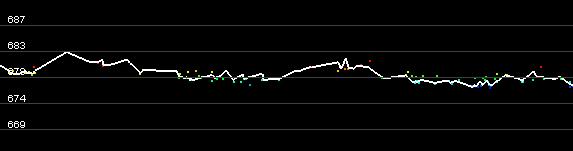
| LIDAR Surface Profile Before Downstream Constraint |
 |
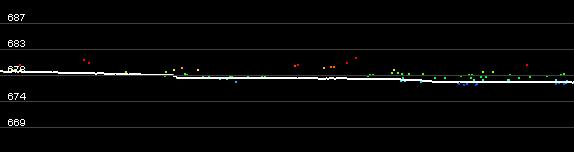
| LIDAR Surface Profile After Downstream Constraint |
 |
Learn how to select a drape description
Learn how to select hydrology constraint errors
Learn how to specify displacement/delta warnings
Learn how to specify displacement/delta summaries
Learn how to modify the nodata value