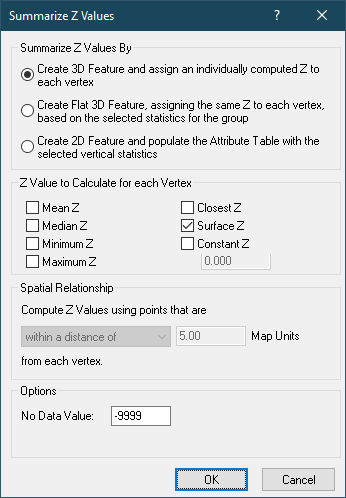

The Summarize Z Values dialog allows you to customize how z values are calculated for input geometry. Z values can be computed on a per feature or per vertex basis. For example, using the by feature option, one or more z values can be calculated for a single feature. The z value(s) are stored in the attribute table in the output data set.
For the by vertex option, one z value is calculated for each vertex in the input geometry. The z values for the by vertex option are stored with the feature geometry in the output data set.
Z values can be computed as a variety of counting, surface, or proximity operations. The following is the list of z values you can calculate for input geometry:
Mean - Mean or average of the LAS point z values
Maximum - Maximum of the LAS point z values
Minimum - Minimum of the LAS point z values
Surface Z - TIN surface elevation from the LAS points (by vertex only)
Closest Z - Closest LAS point z value to the vertex (by vertex only)
Constant Z - A constant specified value.
With the exception of the Surface Z, Closest Z, and Constant Z operations, the LAS points that are used to calculate the z value is defined as a spatial relationship with the feature or vertex. For example, if computing the mean z value of all points within a polygonal feature, you would select the "completely within" relationship. If computing the minimum z value for each vertex, you would select the "within a distance of" relationship, and input a buffer distance to define the circular area around each vertex.
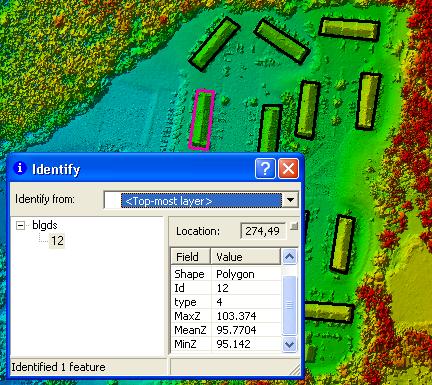
| Mean, Min and Max Z calculated for each building polygon |
 |
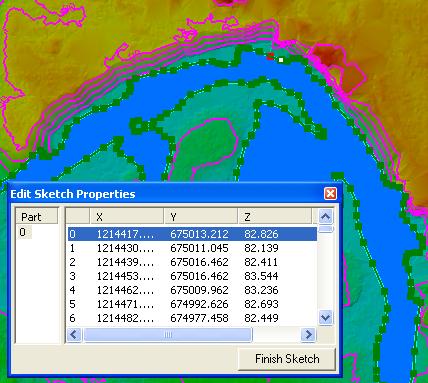
| Surface Z calculated for each vertex |
 |